
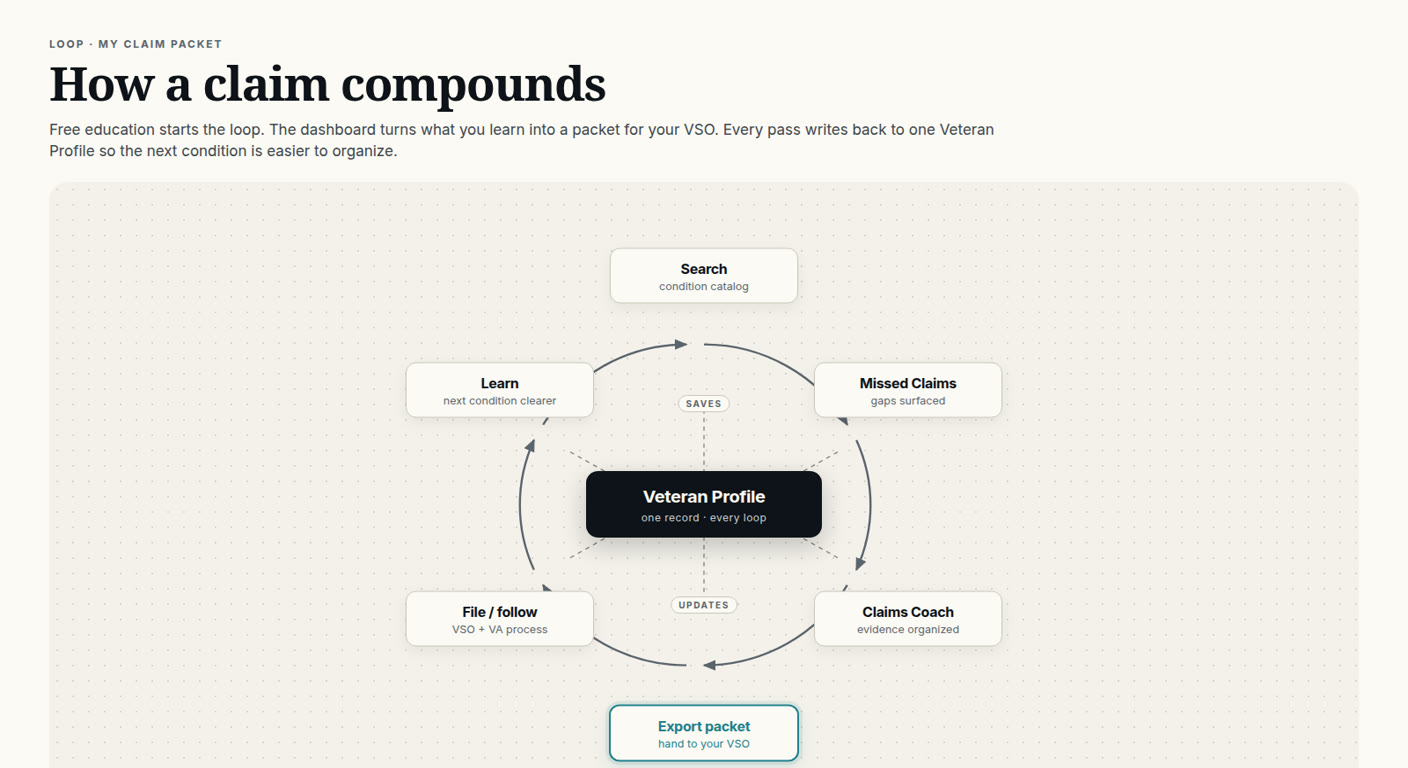
The loop in one breath
Free education starts the loop. The dashboard turns what you learn into a packet for your VSO. Every pass writes back to one Veteran Profile so the next condition is easier to organize. That is the whole product. The rest is walking the circle.
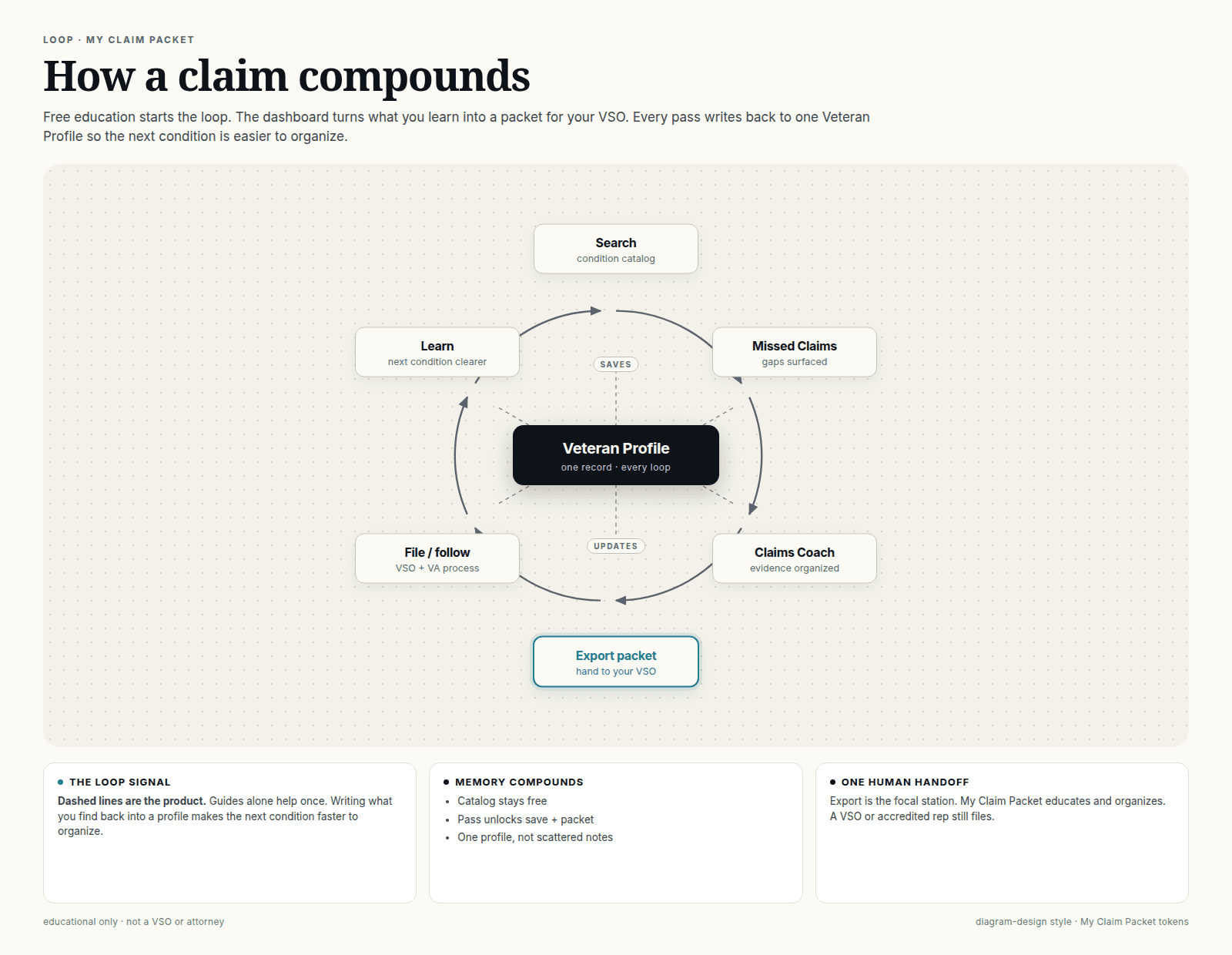
Most veterans do not lose a condition because they never heard of it. They lose it because the notes live in six places: a screenshot, a group-chat link, a folded printout, a “I will remember that” that they do not remember, and two browsers they no longer use. Next month a second condition shows up and the pile starts over.
A loop is different. You still read. You still decide. You still talk to a human who can file. The difference is the dashed lines: every station writes back to one Veteran Profile — one record, every loop — so the next pass is not a scavenger hunt.
Walk the circle once
Six stations, clockwise. None of them is VA. None of them is a promise. They are just the order the work actually happens when you stop treating every condition like a brand-new school night.
1. Search — condition catalog
You start where every veteran starts: “Wait. Is that even a thing?” The catalog stays free. Look up the condition. Read how the schedule talks about it. No login tax for curiosity. Search can save what you found into the profile so you are not hunting the same page next week.
2. Missed Claims — gaps surfaced
This is not a treasure map and it is not a filing plan. It is a prompt: given what you already know about your service and your body, what else might be worth reading? Gaps get surfaced so you can decide what to organize next — with a VSO, not instead of one.
3. Claims Coach — evidence organized
Here the pile becomes a list another human can follow. Coach helps you line up evidence and notes. It does not diagnose you, it does not file, and it does not whisper a percentage. If a sentence sounds like a guarantee, it does not belong in the packet.
4. Export packet — hand to your VSO
The teal station. This is the focal point on purpose. You walk out with a packet. You hand it to a VSO or another VA-accredited representative. That is the product moment: organized, not filed.
5. File / follow — VSO + VA process
Their lane. Filing, follow-up, and whatever VA does with the evidence are the representative's job and VA's job. We do not invent timelines or outcomes here. You follow with the person who can actually represent you.
6. Learn — next condition clearer
You come back smarter, and the profile is still there. The next condition is not a blank page because the last loop already wrote something down. That is the compounding. Not a bigger number. A shorter setup.
Export is the handoff, not the filing
A lot of tools want to sound like they will “handle it.” That is how veterans end up paying claim sharks or signing things they cannot explain. My Claim Packet draws the line at the teal box.
- We educate — the catalog and guides stay readable without a sales pitch.
- We organize — the dashboard turns that reading into one packet.
- A VSO or accredited rep still files.
One human handoff. If you want help finding that human, start with VA's accreditation search or our find-a-VSO directory. Verify accreditation before you share a file or sign a form.
The dashed lines are the product
Guides help once. That is not an insult to guides — I write them. It is just physics. A page you loved in June is a rumor in September unless something saved the work.
Memory compounds when Search saves and Export updates the same Veteran Profile. Missed Claims, Coach, filing follow-up, and the next Learn lap all point at that hub. One record. Not a notes app, not a group chat, not five untitled docs named “final-final.”
- Catalog stays free.
- Founding Pass unlocks save and packet.
- One profile, not scattered notes.
Compounding is setup speed, not a rating
Nothing in this loop assigns a percentage, moves an effective date, or decides service connection. The win is boring and useful: the second condition takes less time to organize than the first because the profile already exists.
Start free, then decide about the Pass
Start on myclaimpacket.com. The homepage search and the condition catalog are free. Read first. If you want the dashboard to keep what you find and export a packet for your VSO, Founding Pass is the unlock — save plus packet, not a predicted rating and not a filing service. Details live on the Pass page.
Educational only — read this before you treat it like a lawyer
My Claim Packet is independent of the Department of Veterans Affairs. We are not a VSO, attorney, claims agent, or medical provider. This article does not provide legal or medical advice, does not guarantee service connection or any outcome, and does not replace a VA-accredited representative. VA decides claims from evidence. If you need representation, use a VSO or another accredited rep.
Quick answers
Does My Claim Packet file my VA claim?
No. My Claim Packet educates and organizes. Export is the handoff: you take a packet to a VSO or other VA-accredited representative, and that person still files. We are not a VSO, attorney, or claims agent.
What is the Veteran Profile?
One record for every loop. Search, missed-claim prompts, coach notes, and packet export write back to the same profile so the next condition is not a blank page. It is an organizer, not a VA account and not a decision.
Is the condition catalog free?
Yes. The catalog and public guides stay free. You can search conditions on myclaimpacket.com without buying anything. Founding Pass is only the unlock for saving that work into a profile and exporting a packet.
What does Founding Pass unlock?
Save and packet. The Pass opens the dashboard so what you learn can be stored on one Veteran Profile and turned into a packet you can hand to a VSO. It does not file, represent you, or predict a VA outcome.
Why is Export packet the teal station?
Because that is the one human handoff. Everything else on the loop is education or organization. Export is where the work leaves the dashboard and goes to a person who can actually file.
Does this change how VA decides a claim?
No. My Claim Packet is independent of VA. VA decides from the evidence in front of it. A cleaner packet can make your conversation with a VSO easier. It does not guarantee service connection, a percentage, or a timeline.
Choose your free next step
Preview a five-question educational plan now, or get the printable Secondary Conditions Checklist by email.
Preview my claim planWant to save this and export a packet later? That's the $59 pass.
Educational information only. My Claim Packet is independent of VA and is not a VSO, attorney, claims agent, or medical provider. We educate and organize. A VSO or accredited representative still files. No guaranteed outcomes, ratings, or timelines. Verify accreditation before you share records or sign a form.